
Salespad automation agent for dynamics gp
Automate the SalesPad Work Your Team Does Routinely
When routine work depends on someone checking workflow queues, forwarding an order, running an invoice transfer, or sending a statement, it is easy for tasks to stack up.
SalesPad Automation Agent runs configured jobs in the background on a schedule you set. It handles repeatable work like reviewing and forwarding eligible documents through workflow, revisiting backorders as inventory becomes available, transferring fulfilled orders to invoices, assigning pickers, sending A/R statements, and delivering scheduled reports.
Instead of asking your team to repeat the same steps throughout the day, Automation Agent handles the routine work in the background, so your people can focus on customers, exceptions, and decisions that need their attention.
Customer success story | C Bennet premium building supplies
C. Bennett used Automation Agent to support 84% growth without adding headcount
C. Bennett Premium Building Supplies’ CFO, Jim Grossrau, describes the value of Cavallo and the SalesPad product like this: “We’ve had 84% growth in the last two years without having to add employees to handle it…we’re able to do it with workflow modifications and Automation Agent. It’s one of those, ‘Oh, we can do this, but [it’s unlocked] what else can we do?’ situations now.”
Why automate with Automation Agent?
People manage work that can run on its own. Now, they don’t have to.
In distribution, small manual tasks create bigger delays than they seem to. Someone has to keep checking whether backorders can be released, move eligible orders to the next workflow queue, transfer fulfilled orders to invoices, and prepare statements and reports.
Automation Agent runs configured jobs in the background on a schedule you set. It helps take repetitive processing and follow-up off your team’s plate, so work does not depend on someone remembering to complete the next step or wait for them to have time to do it. It gives distribution teams a more consistent way to:
Spend Less Time Managing Queues
When orders, quotes, or other documents sit in a workflow queue, someone has to review them and decide whether they can move forward. That is manageable at low volume, but it becomes a steady stream of manual clicks as transaction volume rises.
Automation Agent can review designated queues on a recurring schedule and forward eligible sales documents through SalesPad workflow. It can also move purchase orders, customers, vendors, and items through configured workflows.
Your team spends less time checking queues and moving routine records, and in turn, more time resolving the orders or exceptions that need attention.
Keep Backorders and Billing From Piling Up
A backorder may be ready to move as soon as inventory is available, but it can still end up waiting until someone has time to revisit the queue. The same is true of fulfilled orders that are ready to transfer to invoices.
Automation Agent can revisit designated backorder queues, attempt to allocate available inventory, and forward successfully allocated orders through workflow. It can also scan designated sales order queues and transfer fulfilled documents to invoices on a schedule.
That helps reduce the manual handoffs that can leave orders waiting between inventory availability, picking, shipment, and billing.
Send Important Follow-Up Comms, On Schedule
Customer statements, recurring reports, and routine reminders are necessary, but manually preparing and sending them takes time. When teams are busy, those tasks can become delayed or inconsistent.
Automation Agent can compile and email customer A/R statements, generate and send SalesPad quick reports, and schedule routine emails. It supports recurring statement delivery as well as customer-facing and internal reports.
Instead of rebuilding the same emails and reports each cycle, your team can set the schedule once and focus on follow-ups that require a real conversation.
Automate the work that doesn’t require a person
Leave the routine tasks and repetitive clicks to agents, not humans
In a growing distribution operation, the problem is rarely tackling one big task. It is the hundreds of small ones: checking whether a backorder can be released, forwarding documents to the next queue, assigning order pickers, transferring shipped orders to invoices, or preparing the same customer statements every month.
Each step is necessary. But when those steps depend on a person being available to repeat them, work builds up in queues and the team spends more time managing the process than improving it.
Automation Agent runs configured jobs in the background on a schedule you set. It helps your team automate repeatable workflow, warehouse, billing, and communication tasks, while leaving important decisions and exceptions with the people who need to handle them.
The Challenge
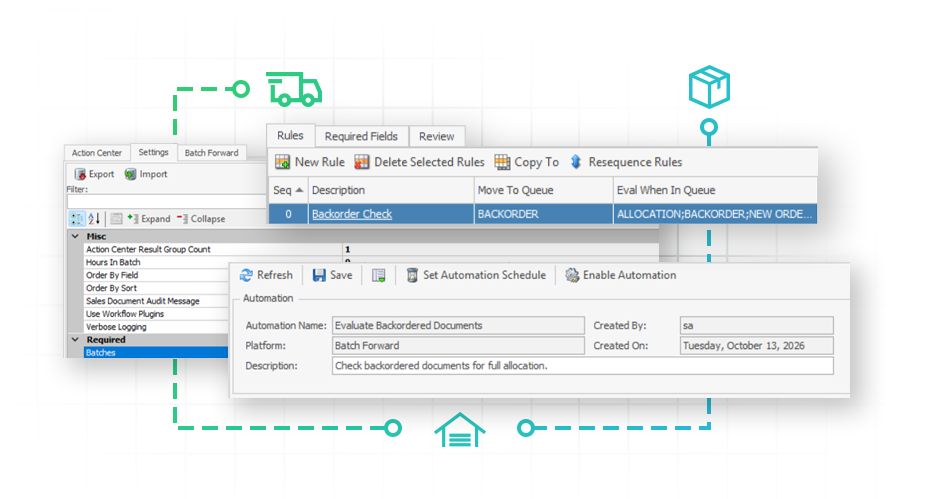
Backorders that wait for a manual check
Inventory arrives, but backorders may remain in the queue until someone reviews them, tries to allocate the available stock, and moves the eligible orders to the next workflow step. That delay leaves orders waiting even when inventory is available.
How Automation Agent helps
Fulfill backorders as stock arrives
Automation Agent can review a designated backorder queue on a recurring schedule and attempt to allocate inventory to those orders. When an order is successfully allocated, it can be forwarded through workflow. When inventory is still unavailable, the order remains in the backorder queue.
Your warehouse and customer service teams do not have to keep revisiting the same queue and checking the same orders to see which are ready to continue.
The Challenge
Orders that need to move forward on schedule
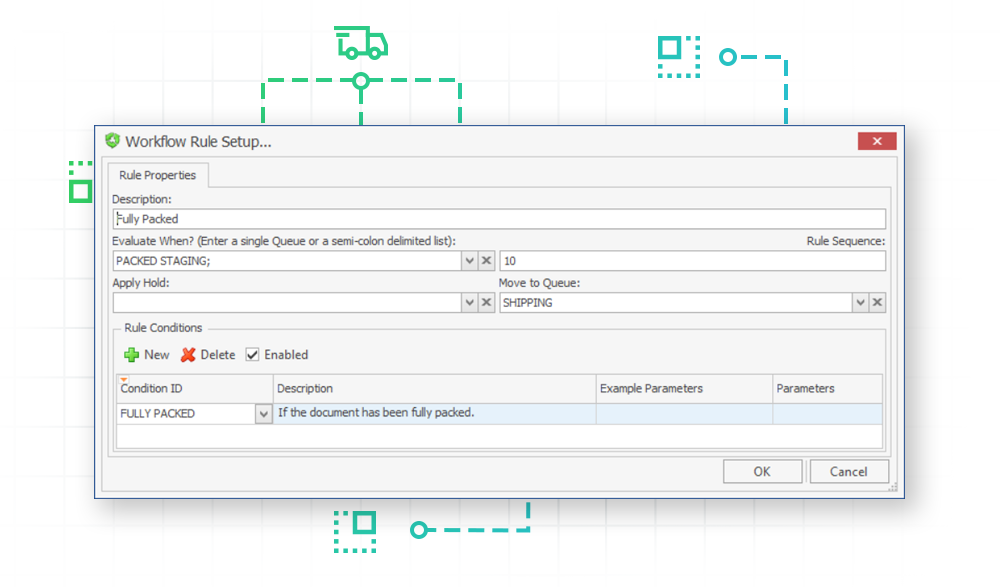
In SalesPad, documents may move into holding queues as they progress through workflow. Teams can batch-forward documents with a single click, but someone still has to remember to check the queue and trigger that action (and often, that needs to happen multiple times throughout the day). When that step depends on a person’s availability, documents that need to move often wait longer than necessary.
How automation agent helps
Keep every order moving
The Batch Forward job reviews sales documents in a selected workflow queue and applies your SalesPad workflow rules and plugins to determine which documents are ready to advance. Those documents can be forwarded automatically, while documents that do not meet the conditions stay in place.
Automation Agent can also move designated purchase orders, customers, vendors, and items through their configured workflows. That helps reduce routine queue management across more of the business, not just for sales.
The Challenge
Fulfilled orders waiting to be invoiced
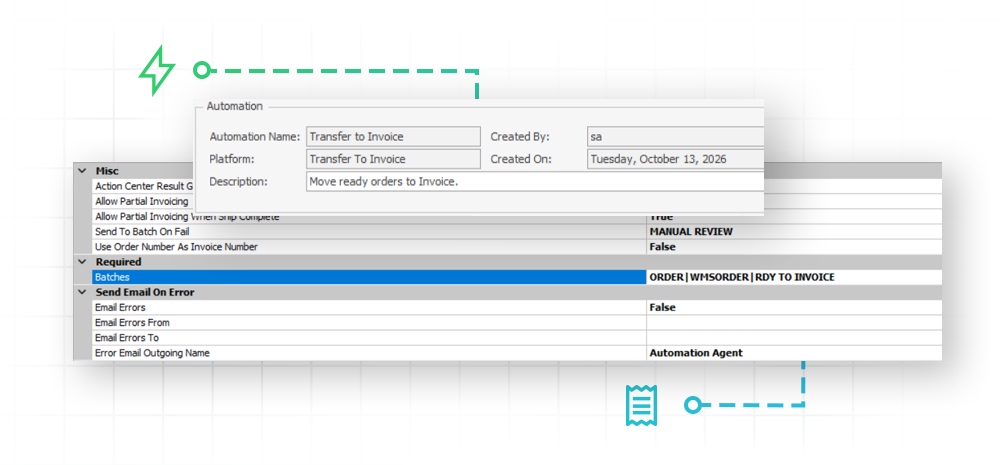
Once an order is fulfilled, someone still needs to run the invoice transfer. When that happens only at the end of the day (or more worryingly, only when someone has the time) fulfilled orders can wait in a queue, and accounting inherits yet another manual task.
How automation agent helps
Invoice without delay
The Transfer to Invoice job scans designated workflow queues for completed orders and transfers them to invoices on the schedule you set. Bonus: it can also be configured to prevent partial transfers for Ship Complete orders.
Instead of making invoice transfers a recurring chore, your team can make them a scheduled background process.
The Challenge
Recurring statements and reports that take too long to put together
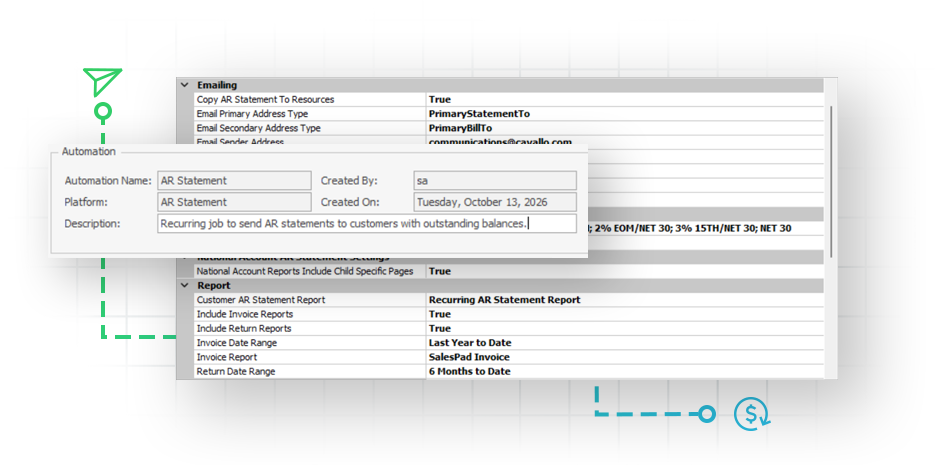
Customer statements and routine reports need to go out consistently, but preparing them manually means selecting records, running the report, verifying recipients, attaching files, and sending emails. It is repeatable work that can consume valuable accounting, customer service, and operations time, plus it causes issues when someone selects the wrong contact or attachment.
How automation agent helps
Send on time, every time
Automation Agent can compile and email customer A/R statements on a schedule. It can also generate SalesPad quick reports and send them to customers, internal SalesPad users, or designated email addresses.
The A/R Statement job supports settings for restricting applicable customers based on their payment terms and outstanding balance, configuring invoice and return date ranges, and consolidating child account details for national accounts. Its test job shows which customers will receive a statement, which will be skipped, and which records may need attention before the job actually runs.
The Challenge
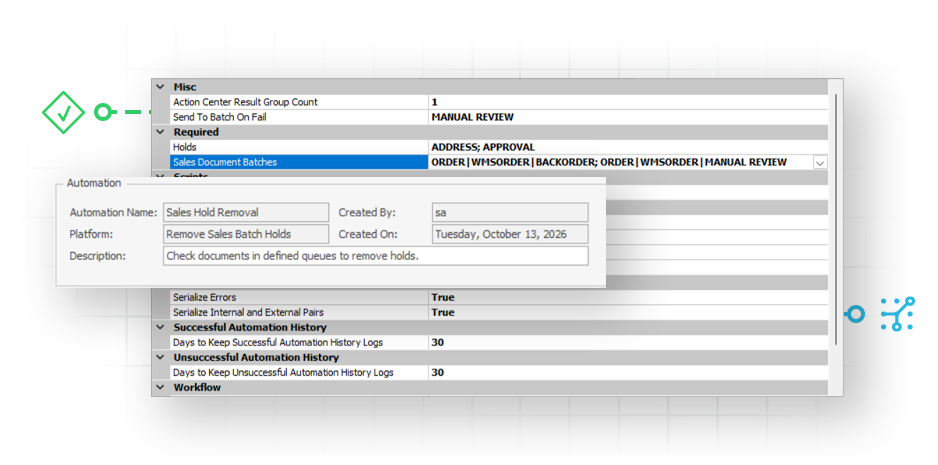
Holds that need routine follow-up
Some held orders need a credit manager, customer service rep, or operations lead to make a decision. Others are held until a known condition is met. Treating both types the same creates more manual follow-up and leaves routine holds sitting in the queue for longer than necessary.
How automation agent helps
Clear holds while you focus elswhere
Automation Agent can review configured sales queues, remove selected holds, and forward cleared documents through workflow. If needed, it can run a pre-hold-removal script for custom validation or processing before a hold is removed.
If an order does not qualify, it can be routed to a designated queue for review. Your team stays involved where judgment is needed, while routine holds can be handled through the process you configure.
The Challenge
Recurring orders that get forgotten, or delayed by manual steps
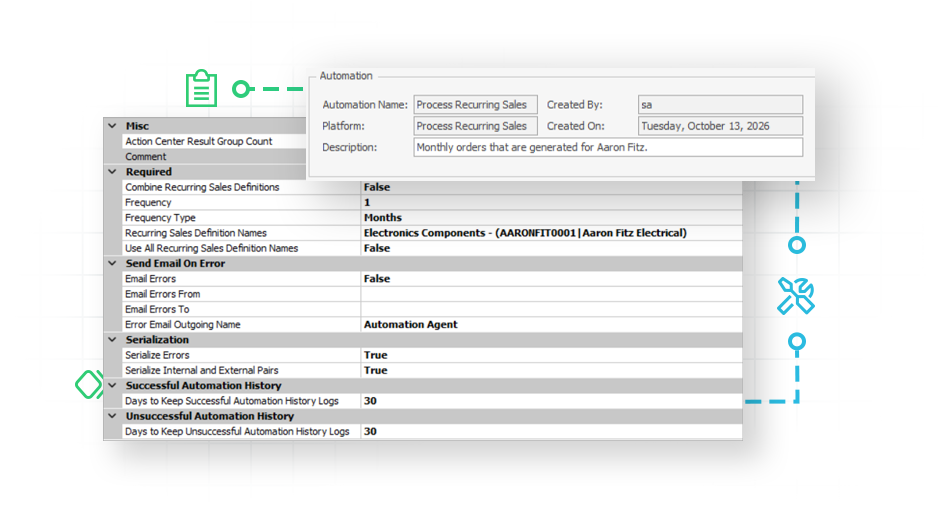
Typically, recurring sales, like subscription orders, lease billing, or monthly retainer contracts, only get created when a team member remembers to run them. That means, inevitably, you’ll sometimes have orders that go out late, or orders that don’t go out at all. That’s the kind of work agents are best at. Plus, automating it takes the stress of remembering to act on a cadence off your team.
How automation agent helps
Never miss a recurring order
Automation Agent triggers the scheduled generation of sales documents for recurring sales. It runs your Recurring Sales Generator on a schedule you set, typically once a day. Whatever recurring sales you’ve built out in SalesPad get generated automatically on the day they’re due, so your team can stay hands-off and focus their attention on the strategic work.
The Challenge
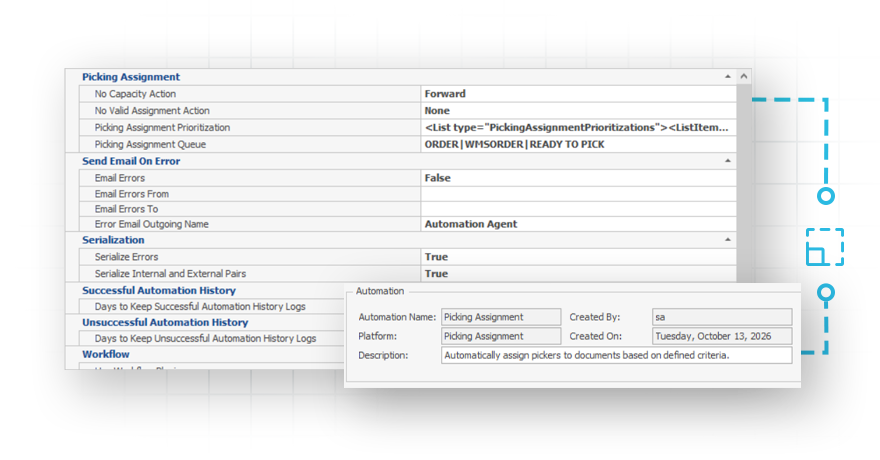
Picking work that needs to be assigned before fulfillment can happen
When documents enter the picking queue, someone may still need to assign them to the right warehouse picker. At higher volume, that adds another manual step before fulfillment can begin.
(Note: Inventory Manager required.)
How automation agent helps
Pick faster with automatic assignements
Automation Agent works with Inventory Manager to assign pickers to sales documents as they enter the picking queue. Assignments follow the picker rules configured for your operation in Inventory Manager. That gives warehouse teams a consistent, automated handoff from order processing to picking, without adding another manual task to someone’s day.
The Challenge
Important automation issues that are hard to spot
A scheduled process is only useful if your team knows when it needs attention. When errors are difficult to find, background jobs become another thing someone has to check manually.
How automation agent helps
Catch issues before they disrupt your workflow
When a scheduled job encounters an issue, Automation Agent records it in an Action Center with a human-readable message and troubleshooting guidance. Administrators can also configure email notifications for critical errors.
Automation Agent checks for active record locks and does not consider a lock to be a failure. If a SalesPad user is currently working on a document, the job can skip that record rather than trying to update it at the same time. It will just try again next time instead of failing the document and causing another review point for admins.
Customer Success Story
Why SalesPad Automation Agent? Do more in less time, even with a lean team
“We have a leaner staff because of SalesPad. We’re able to do more work in less time. Just grabbing your orders and doing a mass update is something that we couldn’t do in Dynamics GP, and the time savings is huge. You don’t really realize it until you actually see it be done. And once you actually see it, it’s … ‘How did we live without it?”

Unwavering support for our SalesPad customers.
You’re in control of your timeline.
The Salespad suite
Built to Master Every Distribution Challenge
When standard ERP functionality isn’t enough, SalesPad steps in. Our suite of specialized products is designed to solve the most difficult challenges in distribution—from the field and the warehouse to the shipping dock and beyond.
Standalone Products
Core software sold in a bundle or separately.
Add-ons
Specialized tools that sit on top of SalesPad products.
SalesPad
Drive operational efficiency for sales, purchasing, inventory management, and beyond.
SalesPad Mobile
Empower field reps to enter orders and check inventory on the go.
Inventory Manager
Mobile-first warehouse management for picking, packing, receiving, and more.
ShipCenter
Native shipping platform with carrier integrations and real-time rate shopping.
ShipTo
Connect SalesPad to UPS WorldShip and FedEx Ship Manager.
Web API
Seamlessly connect SalesPad to your external web stores and third-party apps.
Customer Portal
24/7 self-service B2B web application for order creation, inventory visibility, and invoice payments.
Automation Agent
The background engine that automates document transfers, reporting emails, and customer AR communication.
Customer IQ
Identify high-value accounts and detect early churn signs with AI-driven insights. This intelligence triggers automated workflows to prioritize at-risk outreach and protect your most profitable relationships.
Configurator
Build complex made-to-order items with guided attribute selection.
Manufacturing
Specialized tools for work order management and production tracking.
RMA
Unified customer history and streamlined returns management.
Returns Tracker
Deep visibility into return root causes to protect your margins.
Dispatch
Manage your internal fleet with digital routing and delivery confirmation.
Standalone Products
Core software sold in a bundle or separately.
SalesPad
Drive operational efficiency for sales, purchasing, inventory management, and beyond.
SalesPad Mobile
Empower field reps to enter orders and check inventory on the go.
Inventory Manager
Mobile-first warehouse management for picking, packing, receiving, and more.
ShipCenter
Native shipping platform with carrier integrations and real-time rate shopping.
ShipTo
Connect SalesPad to UPS WorldShip and FedEx Ship Manager.
Web API
Seamlessly connect SalesPad to your external web stores and third-party apps.
Customer Portal
24/7 self-service B2B web application for order creation, inventory visibility, and invoice payments.
Add-ons
Specialized tools that sit on top of SalesPad products.
Automation Agent
The background engine that automates document transfers, reporting emails, and customer AR communication.
Customer IQ
Identify high-value accounts and detect early churn signs with AI-driven insights. This intelligence triggers automated workflows to prioritize at-risk outreach and protect your most profitable relationships.
Configurator
Build complex made-to-order items with guided attribute selection.
Manufacturing
Specialized tools for work order management and production tracking.
RMA
Unified customer history and streamlined returns management.
Returns Tracker
Deep visibility into return root causes to protect your margins.
Dispatch
Manage your internal fleet with digital routing and delivery confirmation.
FAQ
What is Automation Agent
Automation Agent is a SalesPad add-on that runs configured background jobs on a schedule. It helps automate repeatable SalesPad work, such as moving documents through workflow, transferring fulfilled orders to invoices, sending A/R statements, assigning pickers, and emailing recurring reports.
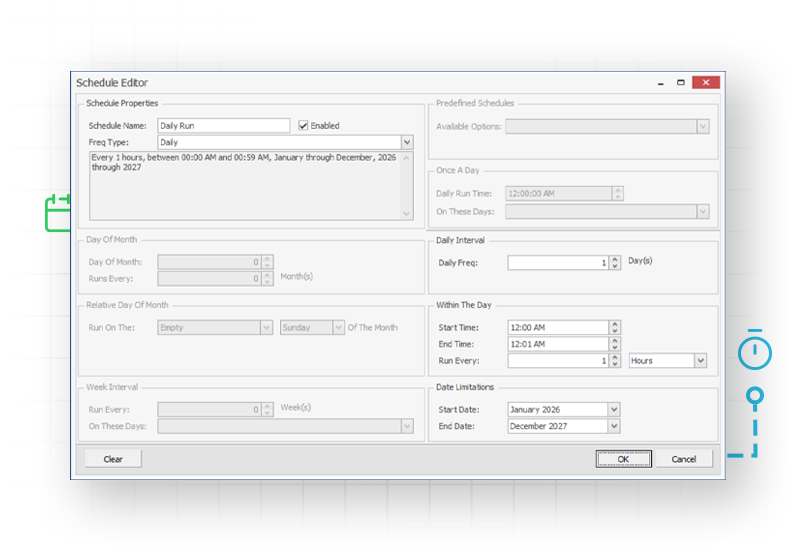
How often can Automation Agent run?
You set the schedule for each job. Jobs can run daily, weekly, hourly, even down to the minute, depending on your configuration and process needs.
What SalesPad tasks can Automation Agent automate?
Automation Agent includes jobs for Sales Batch Forward, Transfer Quote to Order, Transfer Order to Invoice, A/R Statement, Remove Sales Batch Holds, Customer Quick Report Email, custom scripts, and more.
Can Automation Agent send reports automatically?
Yes. Automation Agent can generate SalesPad quick reports and email them to customers, SalesPad users, or designated email addresses. The Customer Quick Report Email job is designed for customer communications, while the System User Quick Report Email job is intended for internal reporting.
What happens if a scheduled job has an error?
Automation Agent records any issues with scheduled jobs in its Action Center, where administrators can review a comprehensive error message and troubleshooting guidance. You can also configure email notifications for immediate visibility of critical errors.
What happens if someone is already working on a document?
Automation Agent checks for active record locks. If a document is being edited by a SalesPad user, Automation Agent can skip it rather than update it at the same time. The job can attempt the document again on a later scheduled run.
Can Automation Agent handle processes unique to our business?
Yes. The Script job can run custom background processes built for your organization. It can be used for specialized checks, data movement, cleanup tasks, or other business logic that goes beyond Automation Agent’s standard jobs.
Does Automation Agent include SalesPad integrations like the eCommerce connectors?
No, Automation Agent is separate from other integration add-ons. SalesPad’s connectors to Shopify, WooCommerce, Adobe Commerce, HubSpot, Pacejet, Square, and Customer IQ are separate offerings with their own features and licensing. When you buy these connectors, Automation Agent is installed to run their scheduled processes, but access to the core automations is only available if you buy Automation Agent as well.