
Maximize Warehouse Efficiency
Stop Walking. Start Shipping.
SalesPad provides real-time inventory visibility, accurate stock control, and automated warehouse flows linked to Dynamics GP. Inventory Manager gives staff mobile access to fulfill orders on-the-go, granting immediate control from the floor and eliminating wasted time at fixed workstations.
Our Commitment
“Our promise is simple: we’re here for the long haul. Cavallo will support SalesPad for GP for at least the next ten years — and longer for customers who continue to rely on us. Because our commitment isn’t to a timeline, it’s to the people and businesses who’ve built their success with us.”

Mike Biwer
CEO, Cavallo
See how we’re supporting SalesPad customers for the next 10+ years.
Fulfillment Bottlenecks
Why Basic Inventory Control Isn’t Enough
Standard Dynamics GP provides core inventory control, but lacks the mobility and real-time enforcement necessary for efficient sales order fulfillment. This leads to costly bottlenecks and errors:
Inventory “black hole”
Items enter the warehouse and disappear from visibility, causing purchasing staff to miss critical restock signals while the sales team continues to oversell non-existent inventory.
Inefficient picking paths
Warehouse staff waste time zig-zagging across the floor following item lists on paper pick tickets as they pick one order at a time.
Frequent order mispicks
Pickers ship the wrong item and don’t follow FIFO/FEFO rules, causing customer frustration on delivery and sunk costs when inventory expires in the warehouse.
Manual data entry errors
Mistyping item numbers or quantities during receiving or counting causes widespread inventory inaccuracies.The solution
SalesPad for GP
SalesPad solves many warehouse management and fulfillment pains, and its Inventory Manager add-on transforms your operations with a real-time, mobile-first environment that drives speed and accuracy. Many of the key features that drive this change—like directed picking and batch picking—are part of Inventory Manager, which you can explore in more detail here (.pdf).
From chaos to control
Intelligent Warehouse Configuration for Optimized Throughput
SalesPad’s Inventory Manager provides the configuration tools necessary to define your physical layout and enforce smart inventory movement, driving efficiency on the floor.
Warehouse Configuration & Logic
Inventory Manager (.pdf) is the central hub for defining the physical structure and rules of your operation, allowing you to set up your warehouse with precise bins and zones to organize inventory movement.
Workflow control
Designate specific bins as “receivable” or “pickable” to enforce a structured flow, routing goods from staging bins to stock bins to picking bins.
Bin attributes & replenishment
Use bin attributes to define item assignments and set min/max quantity thresholds. This logic automatically drives bin replenishment suggestions when picking bins run low, ensuring stock is always available for pickers.
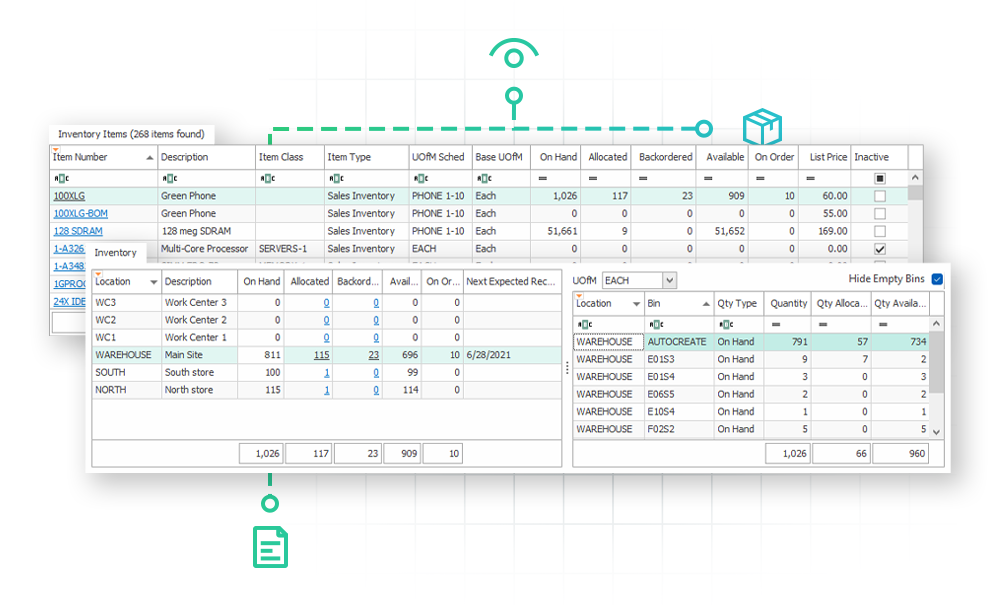
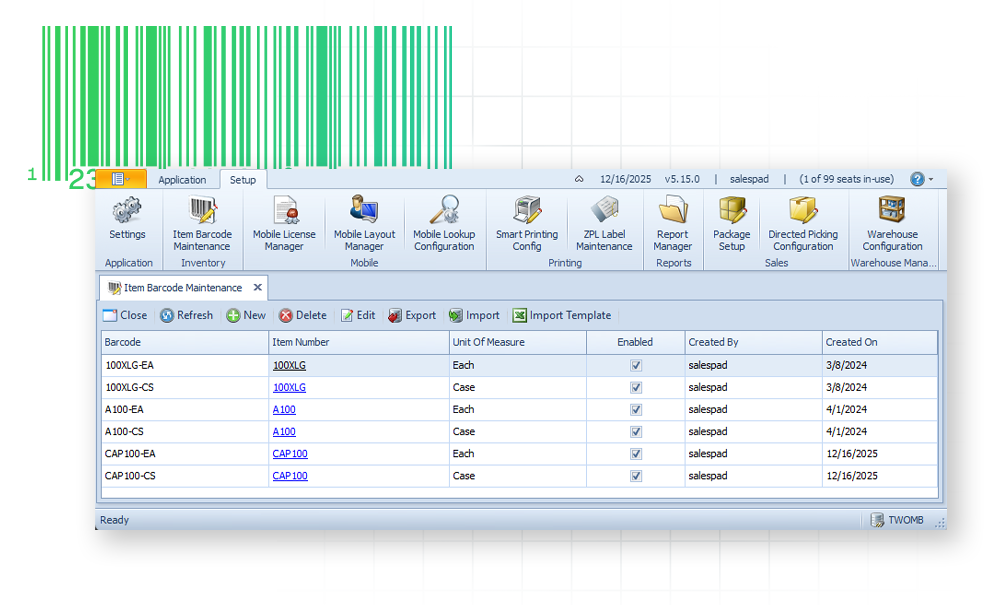
Barcode & Scan Automation
Reduce data entry time and eliminate errors with intelligent barcode translation.
Barcode-to-item mapping
Map manufacturer barcodes (UPC, GTIN) to your internal Dynamics GP item number and specific unit of measure (UoM).
Scan parse scripting
Configure the system to read complex barcodes (like GS1), automatically populating multiple fields (item number, lot number, expiration date) from a single scan.
Accuracy & Control
Real-Time Inventory Visibility
SalesPad ensures your inventory records are accurate and immediately visible across the organization, preventing stock-outs, improving warehouse operations, and elevating customer service.
Real-Time Inventory Management for Unmatched Control
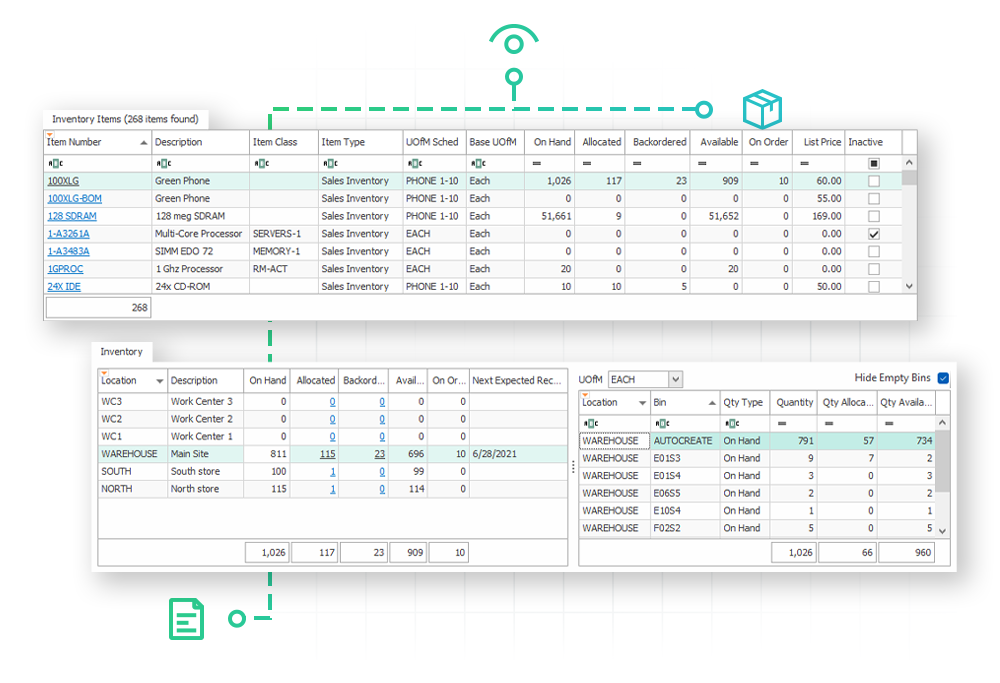
Inventory visibility & drilldown
Get an always real-time view of quantities on hand, allocated, backordered, and on purchase order across all sites.
Item maintenance
Create and manage item masters directly in SalesPad, accessing vendor information and setting reorder points. Overcome GP limitations by extending item data using unlimited user-defined fields (UDFs) native to SalesPad.
Stock counts
Perform cycle counts and physical inventories directly from the floor, ensuring your system reflects the reality of the warehouse in real-time. (Learn how else Inventory Manager (.pdf) can failproof your operations).
Advanced Inventory Tracking
License plating
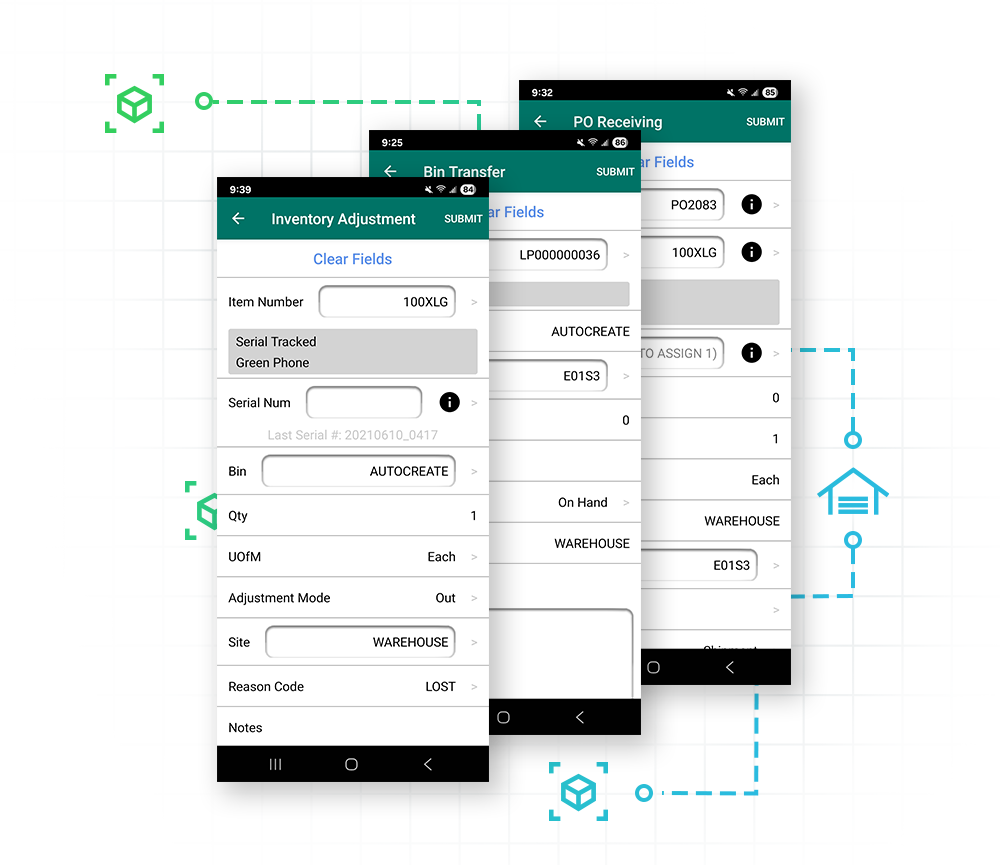
Group items onto a license plate (pallet) for bulk movement. Staff can transfer, pick, or move the entire group by scanning a single barcode, eliminating redundant single-item scans.
Serial and lot tracking
Enforce compliance by supporting auto-assigning serial/lot numbers during receiving and validating these numbers during picking to prevent shipping errors.
Transfers and adjustments
Process site transfers, adjustments in and out, complex in-transit transfers, and immediate bin transfers directly in the Inventory Manager mobile app, with full reason code support.
Kits, packages, and BOMs
Handle complex assemblies easily. Leverage GP-native item kits, or explode them into SalesPad item packages for enhanced flexibility. Empower distribution BOMs and assemblies with workflows and unlimited user-defined fields.
Equipment tracking
Manage and track specific assets, warranties, and rental details via dedicated tabs within the core system, providing a full lifecycle view of high-value inventory.
High-Velocity Fulfillment
Directed Picking to Shipping Automation
The final mile of fulfillment is driven by mobility and integrated workflow, ensuring the right item gets to the customer as fast as possible.
Optimizing the Picking Process
Directed and batch picking
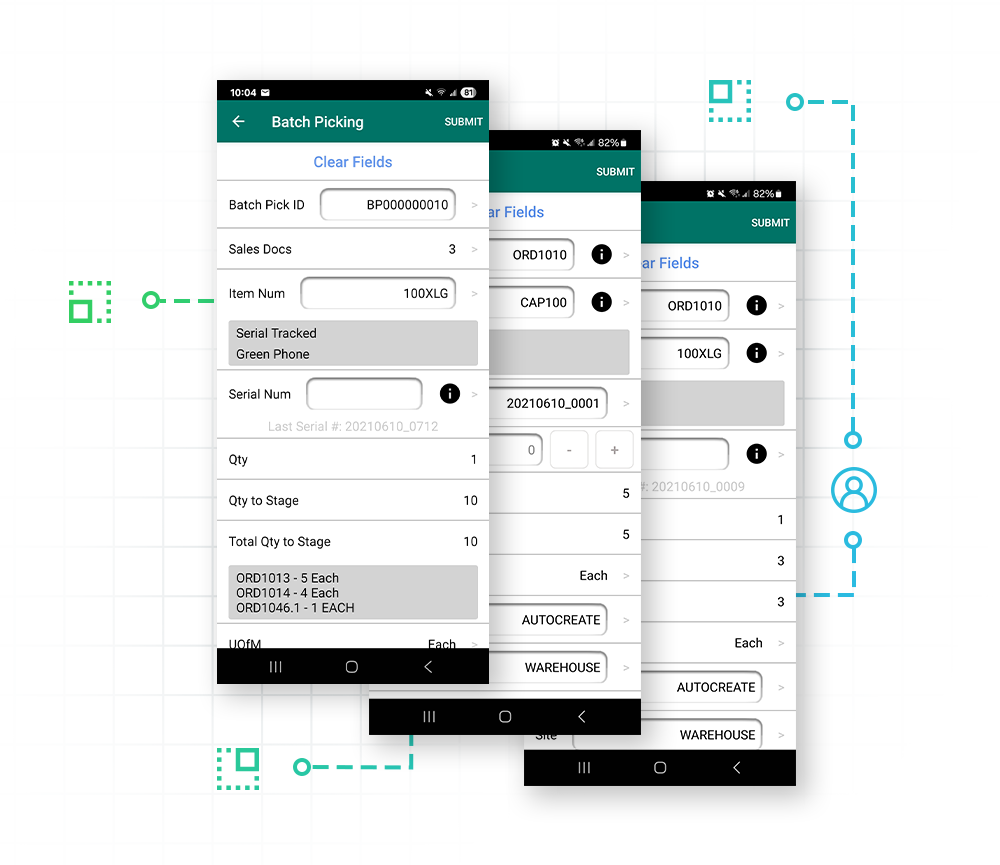
Eliminate inefficient wandering through the warehouse and maximize throughput. Directed picking uses configurable logic to suggest the optimal bin/item path, while batch picking groups multiple sales documents into a single pick run, allowing staff to fulfill numerous orders in one trip and dramatically increasing fulfillment speed.
Zone picking
Assign pickers to specific zones within your warehouse structure to further optimize movement and ensure specialized inventory is handled efficiently.
Picker assignments
Ensure balanced workloads across your team by using picking groups and automated logic. A Picking Assignment Automation Agent (.pdf) job can instantly route sales documents to the correct picker or group as soon as an order is released into the fulfillment workflow.
Integrated Packing and Shippping
Pick and pack integration
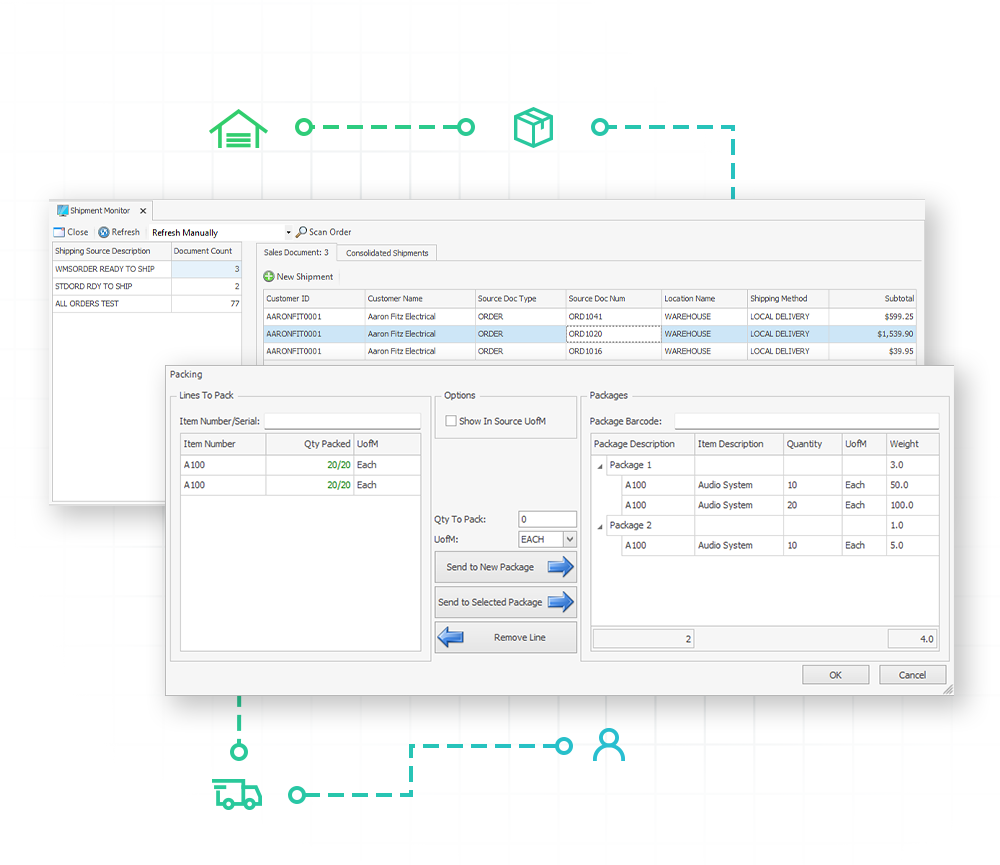
Allow staff to pick an item and immediately assign it to a package in one step on the Inventory Manager mobile app.
ShipCenter visibility
Packages created in Inventory Manager (.pdf) are immediately visible in ShipCenter (.pdf) for shipping label generation, streamlining the process without redundant data entry.
Mispick prevention
The system enforces validation to prevent over-picking and shipping wrong items, ensuring inventory accuracy and customer satisfaction.
Tailormade for Your Distribution Needs
Flexibility Through Add-Ons and Integrations
These core SalesPad products and integrations work together to create a single, high-velocity fulfillment platform integrated with Dynamics GP.
SalesPad Products
Inventory Manager
The central module for warehouse operations. It provides mobile, real-time transaction processing for receiving, transfers, stock counts, and picking/packing, eliminating the need for fixed workstations and paper. Download (.pdf).
ShipCenter
Provides direct integration with major carriers (UPS, FedEx, USPS, etc.) and integrates seamlessly with SalesPad and Inventory Manager workflows. It allows for streamlined label generation using packages created on the warehouse floor, automating the final stage of fulfillment. Download (.pdf).
Automation Agent
The scheduler that powers unattended processing. It can be configured to run the Picking Assignment job, automatically routing sales documents to the correct picker or group as soon as they are ready for fulfillment. Download (.pdf).
Manufacturing Integration (Extended)
Inventory Manager (.pdf) supports mobile transactions (issue, reverse issue, scrap, reverse scrap) and allows picking for manufacturing orders (MOs), extending GP’s Manufacturing module for floor execution. Download (.pdf).

Warehousing & Fulfillment Integrations
Warehouse Management Integration

The connector to external Warehouse Management Systems, allowing SalesPad users to release sales documents to the WMS for fulfillment. Download (.pdf).
Multi-Entity Management (MEM) Integration

Allow warehouse users to filter inventory and fulfillment tasks by Facility ID, enabling them to switch between distinct business entities in real time without the friction of logging out and back in. Download (.pdf).
Customer Success Story
Hoy Shoe Co.
Hoy Shoe Co., distributor of the original Salt Water Sandals, needed a fulfillment platform that could handle high-volume demand without system instability. The implementation of SalesPad Inventory Manager provided the mobile, real-time platform necessary for major operational improvements.
“We actually went a full year without a single mispick. And if someone calls in and wonders whether or not they got an item from us, we can tell them exactly which box to check, and then they usually find the item they thought they didn’t have.”
Jeff Downs
CIO, CFO, and global sales director at Hoy Shoe
FAQ
How does SalesPad Inventory Manager eliminate the "inventory black hole" and provide real-time data back to the sales team?
Inventory Manager eliminates the “inventory black hole” by writing transactions directly to the SQL database in real time, bypassing the need for manual reconciliation or batch updates. Because the mobile app communicates instantly with Dynamics GP and SalesPad, a sales rep at their desk sees an item being received or a bin being picked the exact moment the warehouse staff submits the transaction. This direct integration ensures that sales teams never have to guess about stock availability or fulfillment status, replacing paper-based delays with immediate, verifiable visibility across the entire organization.
How does Inventory Manager ensure inventory accuracy and prevent mispicks on the floor?
Inventory Manager ensures high-velocity accuracy by replacing manual entry with enforced barcode scanning and real-time database validation. By requiring workers to scan the specific item, bin, and serial or lot number, the system instantly validates the pick against the sales order and issues an immediate alert for any discrepancies. This “scan-only” environment—paired with over-picking prevention and direct write-back to the GP database—guarantees that inventory levels are updated the moment a transaction occurs, eliminating mispicks and ensuring the sales team always sees true, pickable stock levels.
What is the difference between directed picking and batch picking, and how do they speed up fulfillment?
The primary difference lies in how they optimize movement: directed picking focuses on route efficiency by guiding a single picker through the most logical, sequential path to prevent backtracking and “motion waste.” In contrast, batch picking focuses on volume efficiency by allowing a picker to fulfill multiple orders simultaneously, visiting a single bin once to gather items for several customers at once. By combining these strategies—guiding the picker along the smartest route while consolidating multiple orders into a single trip—Inventory Manager drastically reduces total travel time and maximizes the number of orders processed per hour.
Can Inventory Manager handle serial and lot-tracked items, and complex inventory movements like license plating?
Yes, Inventory Manager is built to manage high-complexity inventory by providing enforced validation for serial and lot tracking alongside license plating for bulk movements. The system can be configured to auto-assign specific serials or lots based on FIFO logic—forcing a physical scan to ensure the correct item is rotated—while license plating allows you to group multiple SKUs onto a single pallet or container. By associating an entire group of items with one license plate ID, warehouse staff can execute bin transfers, site moves, or fulfillment tasks with a single scan rather than individual SKU counts, significantly reducing repetitive labor.
Can we perform cycle counts without shutting down our entire warehouse for a full physical inventory?
Yes; Inventory Manager enables you to maintain 100% inventory accuracy through cycle counting without the need for costly, full-facility shutdowns. Using the Stock Counts module, your team can perform targeted counts on specific bins, high-value items, or zones while the rest of the warehouse remains fully operational. The system even includes “bin read only” controls to temporarily restrict activity only in the specific area being counted. Once the scan is complete, it automatically generates a variance transaction in Dynamics GP for immediate reconciliation.